
Overview
The OpenResty Settings page allows you to configure the core behavior of the OpenResty web server for hosted domains.
These settings control performance, compatibility, and request handling.
Navigate to the Home > Apps > Openresty Settings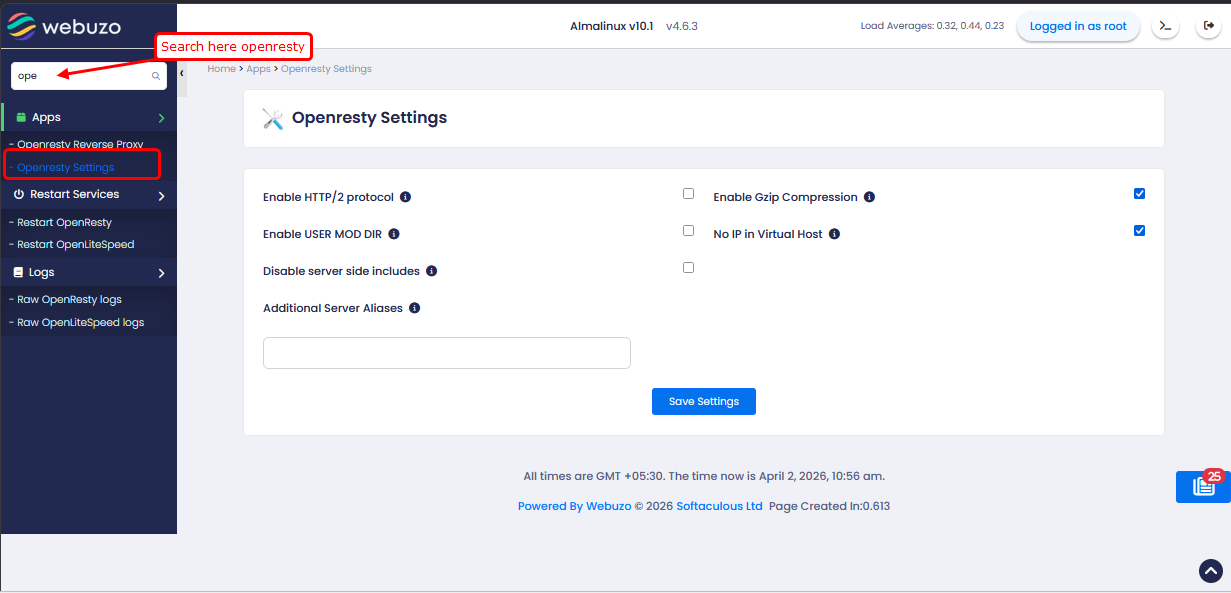
1) Enable HTTP/2 protocol: Enables support for the HTTP/2 protocol, which improves website loading speed and efficiency.
2) Enable Gzip Compression: Check
this option to compress website content before sending it to users.
This reduces data size and improves page loading speed.
3) Enable USER MOD DIR: allow
access to user websites using a URL like
http://your-server-ip/~username, useful for previewing sites before the
domain is configured.
4) No IP in Virtual Host: Check
this option to configure virtual hosts without binding them to a
specific IP address, allowing them to work on all available IPs.
5) Check this option to disable processing of server-side include directives, improving security and reducing server load.
6) Additional Server Aliases: Use this option to add extra domain prefixes (e.g., smtp, pop)
that will be included as ServerAlias for all domains and also covered
under Automatic SSL. Special characters and spaces are not allowed.